
To successfully automate SEO article creation, niche site operators and small teams must shift their mindset from using simple "GPT wrappers" to building comprehensive, multi-step workflows. Make.com acts as the orchestrator for this process, allowing you to connect live search data, custom AI models, and your content management system (CMS) without writing code. However, high-quality automation requires mimicking the workflow of a human SEO strategist: conducting research, analyzing competitors, drafting section-by-section, and maintaining strict editorial control.
This guide breaks down the architecture, essential Make.com modules, and best practices required to build a scalable, high-ranking automated content engine.
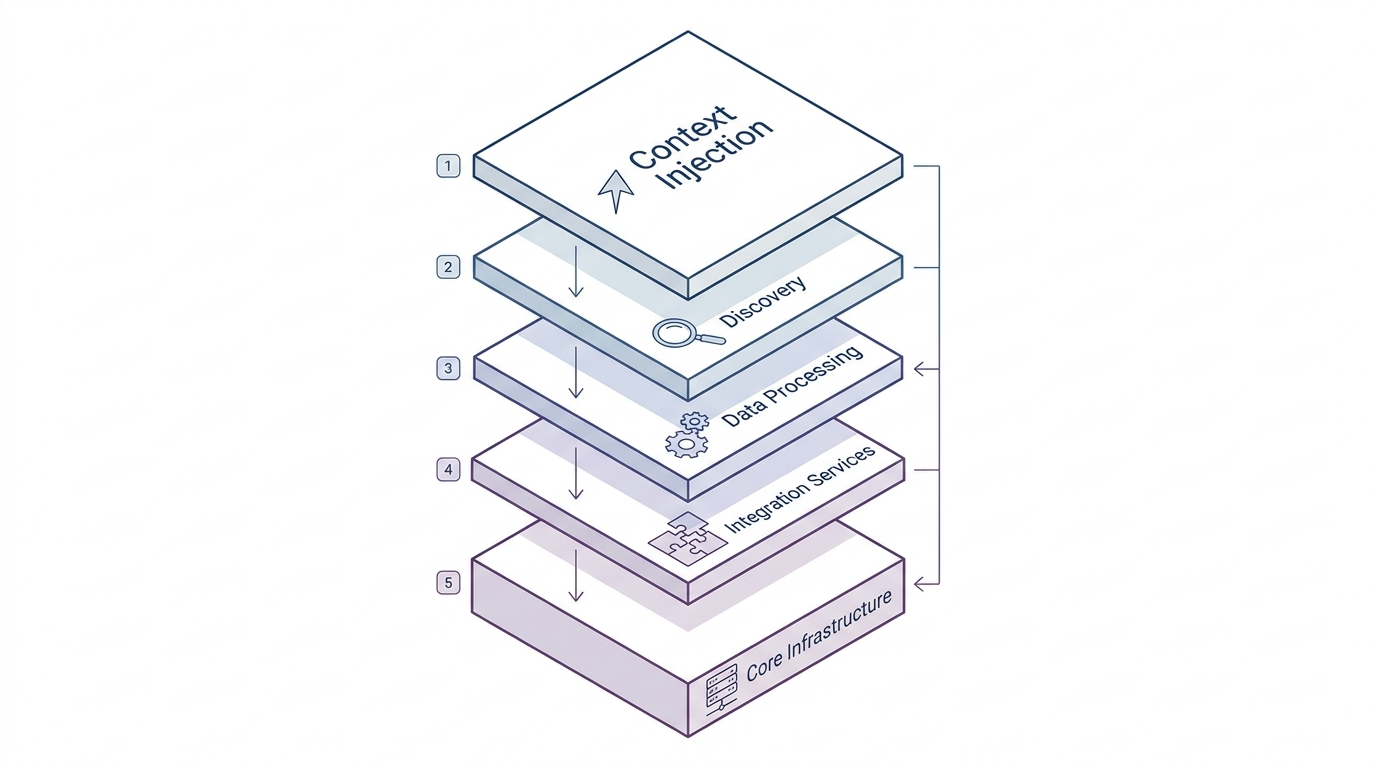
The 5-Layer Architecture for SEO Automation
Expert automation builders agree that a basic "Keyword → ChatGPT → WordPress" sequence produces generic content that fails to rank. Instead, a robust system relies on a 5-layer architecture to ensure topical authority and factual accuracy.
- Context Injection (The Brain): Before generating a single word, the workflow pulls your Ideal Customer Profile (ICP) and brand voice guidelines from a database. This ensures the AI understands exactly who it is writing for.
- Discovery Layer: Using search APIs (like DataForSEO or SerpAPI), the system dynamically hunts for high-volume, low-difficulty keywords based on real-time data rather than outdated static lists.
- Strategy Layer: Make.com uses clustering logic to map out a "Hub and Spoke" model, determining whether the target keyword requires a comprehensive pillar page or a highly specific cluster page. Designing this multi-step AI content pipeline is critical for building topical authority rather than publishing isolated posts.
- Analysis Layer: The workflow scrapes the top three real-time search results to analyze competitor headings, word counts, and sub-topics. This identifies content gaps that your article needs to fill.
- Execution Layer: The AI drafts the content. To prevent the AI from losing focus or hallucinating due to context window limits, the execution layer drafts the article section-by-section before compiling the final piece.
Essential Make.com Modules for Content Workflows
Building this architecture requires specific Make.com modules to handle data arrays, API rate limits, and batch processing.
- Google Sheets / Notion (Watch Rows): This acts as your "Command Center." You drop keywords, target personas, and angles into a spreadsheet, which triggers the Make.com scenario. Using a database is essential for state management—tracking whether an article is "Pending," "Drafted," or "Published" to prevent duplicate processing.
- HTTP Module: Used to connect to external scraping tools (like Firecrawl) or SEO APIs to pull live web content.
- Text Aggregator: When you scrape the top 10 Google results, the data returns as a complex array. The Text Aggregator module compiles these scraped titles, snippets, and URLs into a clean, structured text format that an LLM can easily digest.
- Iterator: When processing multiple keywords in batches, the Iterator module splits a large list of tasks into individual operations, ensuring the system processes one article at a time without timing out.
- Router: This module creates conditional branches. For example, you can route high-difficulty keywords to a more advanced, expensive LLM (like GPT-4o or Claude 3.5 Sonnet) while routing low-difficulty keywords to a faster, cheaper model.
- Sleep: Heavy API requests to OpenAI or scraping tools can trigger server overloads. Adding a "Sleep" module introduces a deliberate delay (e.g., 30 seconds) between heavy tasks to avoid rate limits.
Grounding AI with Live SERP Data and Competitor Outlines
AI models are prone to hallucination if they are not grounded in factual, real-time data. To solve this, your Make.com workflow must feed scraped competitor data directly into the AI's prompt.
📺 How I built an AI SEO Automation to Rank #1 on ChatGPT and ...
Expert demonstrations of high-ranking automated sites reveal a specific tactic: reverse-engineering competitor outlines. By visually dissecting a top-ranking competitor page, you can identify its exact anatomy (e.g., Short Intro → Internal Links → Big Email Capture CTA → Step-by-Step Guide → Embedded Video). You can then program a custom Markdown template into your Make.com workflow, forcing the AI to generate specific structural elements like ## TL;DR or ## Key Takeaways in exact locations.
Furthermore, observed tests regarding AI search engines (like ChatGPT, Perplexity, and Gemini) show an "LLM Citation" effect. Optimizing for traditional Google search and optimizing for AI are effectively the same strategy. LLMs generate their answers by citing highly structured, factual web articles. By automating the publication of deeply researched, well-formatted SEO articles, you position your site to become the source material that AI engines cite in their answers.
The "Human-in-the-Loop" Approval Process
While some developers push for "zero-touch" automation that publishes directly to a CMS, the safest approach for niche site operators is the "Human-in-the-Loop" method. This ensures you scale production without sacrificing editorial quality.
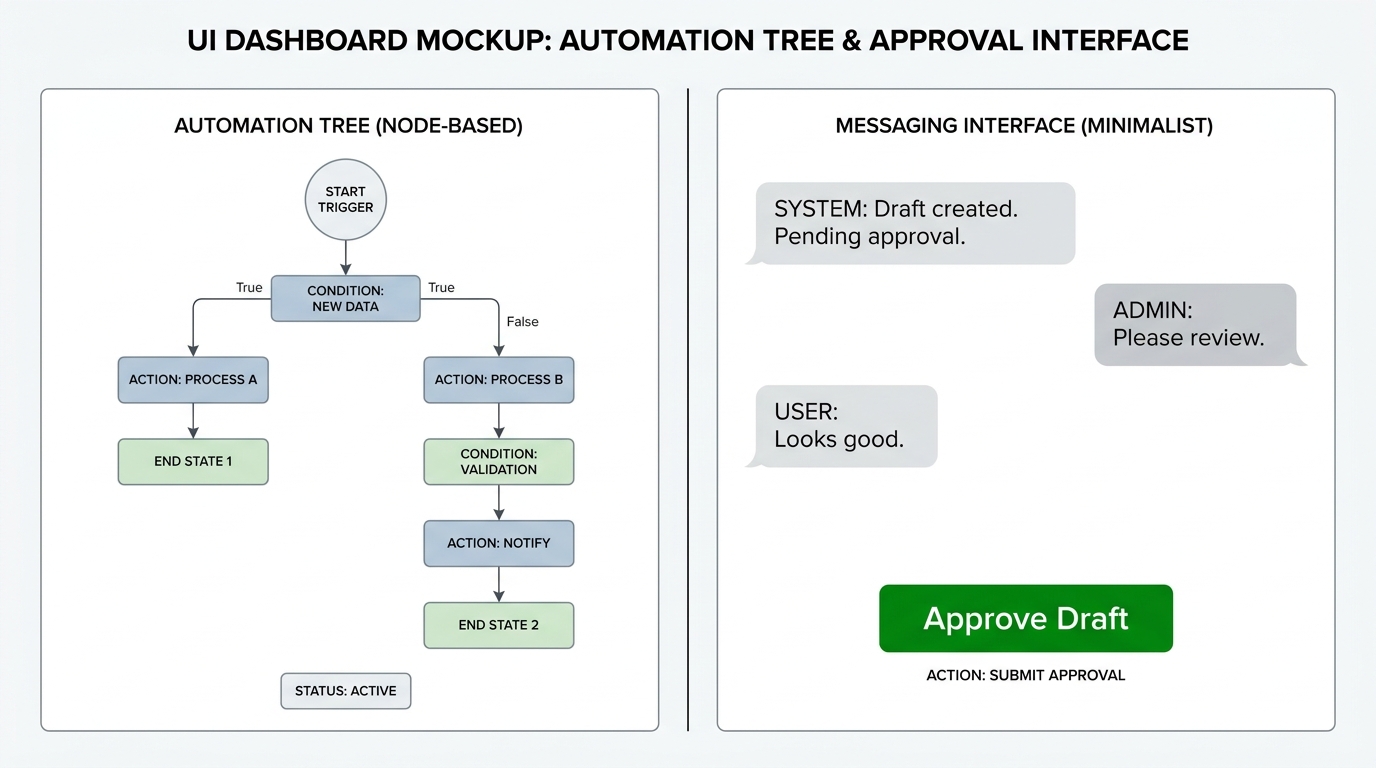
Instead of generating a full 2,000-word article immediately, configure Make.com to generate only the H2/H3 outline first. The workflow then sends this outline to a Slack channel or a LINE messaging group. A human editor reviews the outline, adjusts the angles, and clicks an "Approve" webhook button. Only then does Make.com proceed to the heavy execution layer to draft the full text.
Finally, instead of pushing live HTML directly to your website, output the drafted text to a Google Doc or save it as a "Draft" in WordPress/Ghost. This allows a human to manually review AI-generated tables, verify competitor data, and clean up formatting before hitting publish.
Workflow Comparison: Zero-Touch vs. Human-in-the-Loop
When deciding how to automate SEO article production, teams must choose between fully autonomous systems and editor-assisted workflows.
| Feature | Zero-Touch Automation | Human-in-the-Loop Automation |
|---|---|---|
| Trigger Mechanism | Scheduled daily batch runs via Make.com. | Manual entry via Google Sheets or Jotform. |
| Content Generation | End-to-end drafting in one continuous scenario. | Paused generation; requires outline approval via Slack/Webhook. |
| Final Output | Pushes live HTML directly to WordPress/CMS. | Outputs to Google Docs or CMS "Draft" status. |
| Best Used For | Programmatic SEO, massive glossary builds, data-driven directories. | High-value pillar posts, thought leadership, affiliate reviews. |
| Primary Risk | Hallucinations going live; Google quality penalties. | Bottlenecks if the human editor is slow to approve drafts. |
What to Ignore in SEO Automation
As you build your Make.com workflows, filter out the following outdated or misleading advice:
- The "Blogging is Dead" Fallacy: Ignore claims that producing written articles no longer works. Traffic data dissections of highly successful niche sites consistently prove that massive clusters of specific, informational "How-To" blog posts still drive the vast majority of organic traffic, far outpacing homepage or product page visits.
- "Set and Forget" Myths: Automation suffers from "software rot." APIs change their endpoints, LLM models drift in their output styles, and scraping tools get blocked. Ignore anyone selling a maintenance-free system; automated workflows require active monitoring and hypercare.
- Single-Prompt Wrappers: Ignore tutorials that simply connect a Google Sheet row directly to a single ChatGPT prompt. Without the Discovery, Strategy, and Analysis layers, the output will be thin, repetitive, and unlikely to rank.
Frequently Asked Questions (FAQs)
How do I prevent Make.com from processing the same keyword twice?
Make.com lacks built-in "memory" or state management. To prevent duplicate processing, use a Google Sheet or Notion database as your command center. Once Make.com picks up a keyword, have it immediately update a status column from "Pending" to "Processing."
Why is my Make.com scenario timing out during article generation?
Generating a comprehensive SEO article takes time, often exceeding Make.com's default timeout limits for a single HTTP request. To fix this, break the generation into smaller chunks (section-by-section drafting) and use the Sleep module to pace the API requests.
Can Make.com handle internal linking automatically?
Yes, but it requires setup. You can maintain a database of your existing published articles and their target keywords. During the Make.com drafting phase, you can pass this database to the LLM as context, instructing it to dynamically inject relevant Markdown links into the new article whenever those specific topics are mentioned.
Should I auto-publish directly to WordPress?
For most small teams and niche site operators, no. Search engines have strict quality guidelines regarding programmatic content. Outputting the content as a "Draft" in WordPress allows you to add a final layer of human editorial control, ensuring the tone is perfect and the formatting is clean.
How do I maintain brand voice in automated articles?
Do not rely on generic LLM instructions like "write in a professional tone." Instead, use Make.com to connect to a custom OpenAI Assistant via API. You can pre-train this Assistant with your specific brand guidelines, past successful articles, and negative constraints (words you never use), ensuring the output consistently matches your brand identity.
Turn keyword lists into publishable articles
Install AI Article Agent, upload your topics, and build a repeatable workflow from keywords to structured SEO articles.